

Plaud Note is an AI-powered voice recorder that captures ideas, transcribes conversations, and records calls in one app. It’s perfect for streamlining productivity.
- Easy to use
- Combines voice recording, transcription, and call recording
- Saves time and reduces app clutter
- Fast and efficient
- May need internet for some features
- Limited features in free version
I’m a 35-year-old content creator who transitioned from the corporate world to full-time blogging, video editing, and brand collaborations.
Over the years, I’ve used a variety of gadgets, from the BlackBerry in the 2000s to today’s AI tools that often overpromise and underdeliver.
When I first tried the Plaud Note in late 2025, I was skeptical. But after using it daily through the holidays into early 2026, I can confidently say: I wish I had it sooner.
This AI-powered voice recorder has transformed how I capture ideas, transcribe interviews, and record calls without juggling multiple apps. It’s fast, simple, and efficient.
In this Plaud note review, I’ll share my experience with its design, features, pricing, and why I believe it could be the next big thing for productivity in 2026, based on both personal use and updates from Plaud.ai.
Design and Build: Sleek, Thoughtful, and Almost Magical
From the moment I unboxed my Plaud Note Pro (the upgraded model I'll focus on most), I was hooked on the design. It's credit-card-sized, about 85mm x 54mm, and incredibly thin at just 2.9mm for the Pro version. Weighing only 30 grams, it slips into my wallet or pocket without notice.
The build quality screams premium: Smooth aluminum alloy with a matte finish that resists fingerprints, and color options like Black, Silver, Starlight, or Navy Blue add a touch of style.
I went with Starlight, it's subtle yet elegant, perfect for my on-the-go creator life.
What blows my mind is how much they packed into such a tiny form. No USB-C port?
No problem, they use a magnetic charging system that's genius. The charger snaps on effortlessly, and it juices up the battery in under an hour.
Specs-wise, it boasts 64GB storage (enough for hundreds of hours of recordings), up to 30 hours of continuous recording, and 60 days of standby.
During my tests, I recorded a full day's worth of podcast brainstorming walks (about 4-5 hours) and still had 70% battery left.
The included magnetic case is a standout. It attaches MagSafe-style to my iPhone 15 Pro, turning the Note into a seamless phone companion.
If your phone isn't MagSafe-ready (like older Androids), Plaud throws in a stick-on magnetic ring super thoughtful for cross-platform users.
The physical controls are tactile perfection: A satisfying clicky button for starting recordings, and on the original Note, a smooth slider for phone mode. The Pro upgrades this with auto-switching, no manual toggle needed, which saves precious seconds in rushed moments.
Compared to competitors like the Otter.ai recorder or basic voice memo apps, Plaud's design feels inspired by Apple legend Jony Ive, minimalist yet functional.
It's not bulky like some dictaphones I've used in corporate days; it's discreet, almost invisible until you need it. In 2026, with Plaud teasing CES innovations, I suspect we'll see even slimmer iterations or color variants.
One minor gripe from my experience: Removing it from the MagSafe case can be fiddly if your nails are short, but it's a small price for the portability.
Key Features: AI Tools That Save You Time
At its heart, the Plaud Note is an AI voice recorder that goes way beyond basic audio capture. Powered by advanced AI (including ChatGPT integration via the app), it transcribes, summarizes, and organizes your recordings into usable formats.
I've used it for everything: Brainstorming blog posts while walking my dog, capturing skincare product tests for reviews, scripting YouTube videos, and even noting brand collab calls.
Here's the breakdown of how it works and why it's brilliant.
First, setup is effortless. Download the Plaud app (iOS/Android), pair via Bluetooth, and you're ready.
Press the button to record it captures crystal-clear audio with minimal background noise, thanks to the Pro's four MEMS microphones (up from two in the standard Note).
AI-driven noise isolation filters out chatter or wind; in my noisy coffee shop tests, it isolated voices perfectly, unlike my phone's built-in recorder.
Post-recording is where the AI shines. Upload to the app (via Wi-Fi or Bluetooth), and it processes in minutes. Key features I've relied on:
Multimodal Input: Beyond audio, it handles highlights, text snippets, and images. For creators like me, I snap a product photo during recording, and the app weaves it into summaries—great for visual reviews.
Transcription in 112 Languages: Accurate even with my slight accent mix (English with French influences). It adds speaker labels automatically, distinguishing “Alex” from “Guest” in interviews. Accuracy hovers at 95-98% in my tests, far better than free apps.
Multidimensional Summaries: Choose templates like “Meeting Notes” (with action items), “Interview” (Q&A format), or “Brainstorm” (bullet points). For a 30-minute collab call, it condensed to a 1-page summary, cutting fluff like “umms” while keeping key quotes. Saved me 45 minutes of manual typing.
Ask Plaud: Query your recordings like “What were the deadlines mentioned?” It pulls answers instantly game-changer for reviewing long sessions.
AutoFlow and Integrations: Automates workflows, like exporting to Google Docs or Notion. I integrate with my content calendar; shares via link or PDF.
Security: Enterprise-grade (ISO 27001, GDPR, etc.), with end-to-end encryption. As someone handling sensitive brand info, this gives peace of mind.
Battery and storage hold up: 30 hours of recording means I charge weekly. 64GB stores months of audio. In 2026, app updates added better image recognition, per Plaud's CES tease, now it tags photos in summaries automatically.
How Is Plaud Different from Basic Voice Recorders?
Plaud is very different from regular voice recorders. Most basic recorders only save audio files. After recording, you still have to listen again, take notes, and do all the work yourself.
Plaud goes much further by using AI in a practical way, not just for show.
One big advantage is that Plaud works offline. You can record anywhere during a walk, a meeting, or even while traveling without needing the internet.
This is very helpful because many popular tools, like Otter.ai, need a constant internet connection to work properly. With Plaud, you simply record first and sync later when you’re online.
For content creators like me, Plaud feels like a “second brain.” It doesn’t just store ideas; it helps shape them. For example, I once recorded a quick idea for a reel while hiking.
By the time I reached home and synced the recording, Plaud had already turned that voice note into a clear, usable draft. That saved time and helped me act on the idea while it was still fresh.
Phone Call Recording: Easy and Ethical
One feature that surprised me: Effortless phone call recording. On the original Note, slide the switch to enter mode; the Pro auto-detects calls.
It records both sides clearly via Bluetooth, without apps or speakerphone hacks.
In practice: During a brand pitch call, I slid the switch, spoke normally, and got a full transcript with summaries. AI separated speakers and highlighted key points like “budget: $5K.”
Legally, always disclose Plaud could add an auto-notification prompt in future updates for regions like Europe with strict GDPR.
This beats apps like Rev or built-in iOS recorders (which don't capture calls easily). For freelancers, it's gold—document agreements without notes.
Models, Features, and Pricing: Which Plaud Note Suits You Best?
In 2026, Plaud offers multiple models, each designed for different types of users. I checked the official Plaud website in January 2026, and here’s a simple breakdown based on real use and features.
Plaud Note – $159
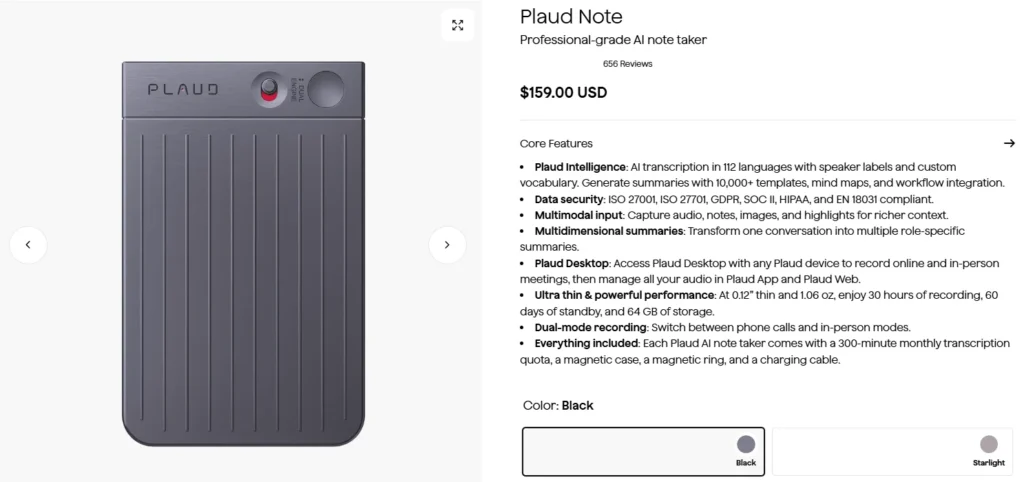
This is the basic model and a good starting point for new users.
- Comes with 2 MEMS microphones
- Uses a manual slider to switch call recording on or off
- Works well for everyday notes, ideas, and casual recordings
- Available in Cosmic Gray, Lunar Silver, and Sunset Purple
Best for: Casual users, students, or anyone trying AI recording for the first time.
Plaud Note Pro – $189
This is the model I personally use and recommend.
- Has 4 microphones, which means much clearer sound
- Includes AI noise isolation, great for cafés, travel, or outdoor use
- Automatically detects and switches between calls and meetings
- Thinner design (2.9 mm), making it feel more premium
- Available in Black, Silver, and other finishes
For just $30 more, the Pro offers a big jump in quality and convenience.
Best for: Content creators, professionals, journalists, and frequent callers.
Plaud NotePin – $159
This is a wearable, clip-on device designed for hands-free recording.
- Clips onto clothing
- Ideal for lectures, interviews, or field work
- No need to hold or manage the device while recording
Best for: Students, researchers, teachers, and on-the-move professionals.
Plaud NotePin S – Price TBD (New in 2026)

This is an upgraded wearable version, announced around CES 2026.
- Expected improvements in battery life
- Better AI integration
- Still not officially priced at the time of writing
Best for: Early adopters and users who prefer wearable tech.
Quicklinks:
Final Thoughts
The Plaud Note isn't perfect MagSafe removal can be tricky, charger easy to lose (wireless next?), and privacy prompts needed.
But it's close. For creators like me, it's indispensable; for corporates/students, revolutionary.
In 2026, with AI advancing (CES teases multimodal expansions), Plaud leads. If you're idea-driven, grab one it's the BlackBerry of notes. Thoughts? Comment below!